
The mobile workforce management market crossed $8.1 billion in 2026, growing at nearly 13% per year. Behind that number are millions of field workers, delivery crews, consultants, and construction teams who track their hours from a phone. Most of the apps they use give them a timer and little else. WebWork Time Tracker just changed that with a ground-up rebuild of its mobile apps for iOS and Android.
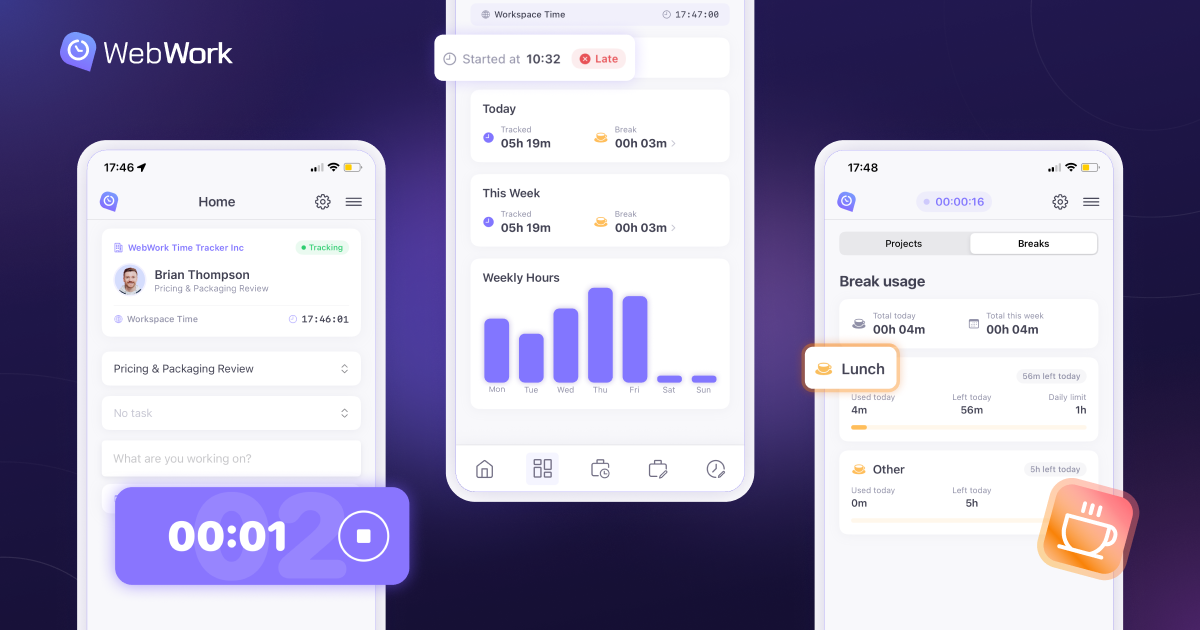
The new apps are not an incremental update. They were rebuilt from scratch to function as a complete mobile workspace — project and task tracking, break management, editable time entries, GPS route history, and native OS integration — for teams that do their work away from a desk.
“We looked at what mobile time tracking apps actually offered, and the answer was almost always the same — a timer,” said Vahagn Sargsyan, Founder and CEO of WebWork. “We wanted to build something a field worker could rely on for their entire workday, from selecting the right project to editing a time entry after a client visit.”
What Changed
The previous WebWork mobile apps handled time tracking with project and task selection and GPS location. The new versions go much further.
Time entries are fully editable from the phone — add, modify, or delete entries without waiting to get back to a computer. A daily and weekly overview shows tracked hours at a glance. A dedicated tasks page lets employees create tasks, update statuses, and see time tracked per task, all from mobile.
Break tracking is built in with policy enforcement. If a company sets a 30-minute lunch and two 15-minute breaks, employees see exactly how much time remains for each type. Break time logs separately from work time, keeping timesheets clean for payroll.
GPS now records full route history alongside location pins. Managers can view the path a field employee traveled on an interactive map — a material difference for construction crews, delivery drivers, and home health aides whose billing and compliance depend on accurate location records.
The mobile apps do not capture screenshots, track app or website usage, or measure activity levels. Those monitoring features remain on the WebWork Desktop Tracker, where they make sense. The mobile time tracking apps are purpose-built for time, location, tasks, and breaks.
Built for Daily Use
Small design choices reveal how much thought went into the rebuild. The running timer appears as a Live Activity on the iPhone Home Screen and Lock Screen, so employees see their tracked time without opening the app. Face ID unlocks the app instantly. Haptic feedback confirms when tracking starts or stops — useful on loud job sites where a visual cue alone might get missed.
Offline tracking runs automatically. If a worker loses cell service on a remote site or inside a concrete structure, the app keeps recording and syncs everything when connectivity returns. Cross-platform sync means hours tracked on mobile appear in the same reports and timesheets as hours tracked on desktop, web, or the Chrome extension.
Kiosk for On-Site Teams
The mobile redesign is part of a broader push to meet workers wherever they clock in. WebWork’s Time Clock Kiosk gives on-site teams a shared clock-in solution on a single device. Employees use personal PINs to clock in and out, take breaks, and switch projects. Built-in anti-fraud measures, a real-time attendance dashboard, and direct payroll integration keep operations clean across multiple locations. Within the next month, the kiosk will also be available on mobile, so field teams and workplaces without dedicated hardware can run it from any phone or tablet.
AI Across the Platform
WebWork’s AI assistant works across the entire platform — monitoring activity patterns, flagging burnout risks and workload imbalances, and sending proactive alerts before small issues become bigger problems. In early 2026 the AI became fully agentic, creating tasks, generating performance summaries, and communicating directly inside Slack and WebWork Chat without being prompted.
Runs Everywhere, Syncs in Real Time
WebWork runs on Windows, macOS, Linux, iOS, Android, and the web, with a Chrome extension for browser-based tracking. All platforms sync in real time. An employee can start a timer on their phone at a job site, switch to desktop at the office, and every minute shows up in the same timesheet.
About WebWork
WebWork Time Tracker is an AI-powered time tracking and workforce management platform used by businesses worldwide. Founded in 2016, WebWork started as an internal tool for a software development agency and grew into a full platform covering time tracking, employee monitoring, productivity analytics, project management, payroll, and team communication. The mobile apps are available on the App Store and Google Play.